A practical B2C app marketing plan starts with ASO as the foundation, a focused paid-plus-creator UA stack, and a 90-day execution roadmap that ties every KPI to a budget decision. Before you run a single ad, your store listing needs to convert, your attribution SDK needs to fire, and your first meaningful in-app event needs to be mapped. Organic store search drives a large share of lifetime installs for indie apps, which means paid spend on top of a broken listing is money thrown at a leaky funnel.
Your 90-day starter plan:
- Phase 1 (Days 1–30) — Foundation: Complete ASO (keywords, screenshots, preview video), instrument your MMP, map your top five in-app events, and run a small Apple Search Ads keyword test to validate search demand.
- Phase 2 (Days 31–60) — Launch: Activate one paid social channel (Meta or TikTok), launch your first creator campaign, collect your first 500–1,000 installs, and monitor D1/D7 retention against category benchmarks.
- Phase 3 (Days 61–90) — Iterate and scale: Double down on the creative and channel combinations hitting your target CPI, cut what is not, and build your first lifecycle messaging flow for users who installed but did not activate.
Execute in the next 24–72 hours:
- Run an Apple Search Ads keyword test with a $50–$100 daily budget to surface real search volume in your category.
- Map five in-app events (registration, onboarding complete, first core action, paywall view, purchase) in your MMP dashboard.
- Set up a store listing experiment in App Store Connect or Google Play Console to A/B test your primary screenshot.
Key Takeaways
A B2C app marketing plan that prioritizes ASO, a focused paid-plus-creator UA stack, rigorous event mapping, and a phased 90-day roadmap consistently outperforms fragmented, channel-first approaches that skip the measurement foundation.
| Point | Details |
|---|---|
| ASO before paid spend | Organic store search drives a large share of lifetime installs; optimize your listing before scaling any paid channel. |
| Map events before launch | Instrument your activation event in your MMP before running paid campaigns to optimize toward quality, not volume. |
| Measure D7 retention by channel | D7 retention by cohort reveals which channels deliver valuable users, not just installs. |
| Follow the 90-day roadmap | A phased plan (foundation → launch → iterate) consistently outperforms one-off launch bursts for early-stage apps. |
| Cult Media for creator UA | Cult Media's commission-only model ties payment to verified views, reducing risk and aligning creator incentives with your CPI target. |
Table of Contents
- What makes a B2C app marketing plan different from a standard B2C strategy
- How to set goals and the KPIs your plan must move
- How to define target users and position your app to win them
- Which channels actually work for finding and converting app users
- ASO essentials that make your store listing convert
- A creative testing framework that produces scalable winners
- How to measure installs and outcomes correctly
- How to allocate budget and plan media across stages
- How to turn installs into retained, monetizable users
- Your week-by-week 90-day execution roadmap
- Cult Media's creator-driven UA playbook
- Pre-launch and launch checklist for your app marketing campaign
- Legal and compliance considerations in B2C app marketing
- How a commission-only creator network accelerates your UA
- Sources
- FAQ
What makes a B2C app marketing plan different from a standard B2C strategy
B2C app marketing is the practice of acquiring, activating, and retaining consumers through a funnel that runs entirely inside two gatekeepers: the App Store and Google Play. The funnel moves from discovery to install to activation to retention to monetization and advocacy, and every stage has app-specific constraints that general B2C marketing does not face.
The biggest structural difference is the store layer. A DTC brand drives traffic to a landing page it controls. An app drives traffic to a store listing it does not fully control, where a competitor's ad can appear directly below its icon, where ratings and review velocity affect algorithmic rank, and where the install-to-activation gap can swallow half your paid budget before you notice. In-app monetization models (subscriptions, in-app purchases, ad-supported tiers) also create a measurement problem that does not exist in e-commerce: the revenue event is downstream of the install by days or weeks, which makes ROAS calculations harder and LTV modeling non-negotiable from day one.
Two operational consequences follow from this:
- ASO is not optional. It is the highest-leverage durable channel, and it must be in place before you scale paid. Paid traffic sent to an unoptimized listing converts at a fraction of its potential.
- LTV tracking must start at launch. Because the revenue event lags the install, teams that optimize only for install volume routinely acquire users who never monetize. Cohort-level LTV data, even at 7-day and 14-day windows, changes every budget decision downstream.
How to set goals and the KPIs your plan must move
Start with the primary business objective and work backward to the metrics that prove it is moving. Most consumer apps sit in one of three objective buckets: user acquisition growth, subscription or revenue growth, or engagement and retention improvement. Each maps to a distinct KPI set.
| Objective | Primary KPIs | Secondary KPIs |
|---|---|---|
| User acquisition growth | Installs, CPI, CAC | Store CVR, organic vs. paid split |
| Subscription / revenue growth | LTV, ROAS, payback period | Trial-to-paid rate, MRR |
| Engagement / retention | D1/D7/D30 retention, DAU/MAU | Session length, feature adoption rate |
KPI definitions that matter:
- CPI (Cost Per Install): Total spend divided by installs. Useful for channel comparison, but meaningless without downstream quality data.
- CAC (Customer Acquisition Cost): Total spend divided by paying customers. The number that actually connects to unit economics.
- D1/D7 retention: The percentage of users who return on day one and day seven after install. Industry medians sit around 25% for D1 and 10–15% for D7 across mobile apps, though gaming and utility apps diverge significantly.
- DAU/MAU ratio: Daily active users divided by monthly active users. A ratio above 20% signals a habit-forming product; below 10% is a warning sign for subscription viability.
- LTV (Lifetime Value): Projected revenue per acquired user over a defined window. Model at 30, 90, and 180 days early on, then extend as cohort data matures.
- ROAS (Return on Ad Spend): Revenue attributed to a campaign divided by its cost. For subscription apps, use predicted LTV rather than day-zero revenue.
- Payback period: How many months it takes for a cohort's revenue to cover its CAC. Twelve months or fewer is a common target for VC-backed consumer apps.
Benchmark callout: According to AppsFlyer's UA guide, teams that map in-app events before scaling paid spend consistently improve ROAS because they can optimize toward quality signals rather than raw install volume.
Sample daily/weekly dashboard fields:
- Installs by channel and campaign
- CPI by channel (daily)
- D1 retention rate (rolling 7-day average)
- DAU and DAU/MAU ratio
- Revenue and trial-to-paid conversion rate (weekly)
- Payback period estimate by cohort (weekly)
How to define target users and position your app to win them
Persona work for apps is not about demographics alone. It is about acquisition intent: what problem is the user solving, what moment triggers the search, and what competing solution are they leaving behind. A persona template that does not answer those three questions will produce generic creative and wasted spend.
Short persona template:
- Who they are: Age range, platform preference (iOS vs. Android), and one behavioral trait (e.g., "daily commuter who listens to podcasts").
- The trigger moment: The specific situation that makes them search for your app (e.g., "just started a new fitness goal in January").
- The competing alternative: What they are currently using or doing instead (a spreadsheet, a competitor app, nothing).
- The value hook: The single line that makes your app the obvious switch (e.g., "tracks macros in under 10 seconds per meal").
Positioning brief structure:
- For: [Segment name]
- Who: [Trigger moment]
- Our app: [Product name]
- Is the: [Category]
- That: [Primary benefit]
- Unlike: [Competing alternative]
- We: [Key differentiator]
This brief should drive your screenshot copy, your creator brief, and your paid ad headline. If a creative does not reflect the brief, it will likely underperform against your best-fit segment.
Segment prioritization framework:
Rank segments by three factors: size of the addressable audience, ease of reaching them on your available channels, and expected LTV based on the monetization model. Win the highest-LTV, most-reachable segment first. Measure success per segment by tracking CPI and D7 retention separately, not blended.
Validating persona assumptions quickly:
- Run a $200–$500 Apple Search Ads test targeting keywords your persona would use. High CVR confirms search intent.
- Check your analytics for behavioral clusters in your first 200 installs. Do users who complete onboarding share a traffic source or device type?
- Survey churned users (via email or in-app) within 48 hours of their last session. Their answers will correct your persona faster than any focus group.
Which channels actually work for finding and converting app users
The recommended starter stack for most consumer apps is ASO plus one high-intent paid channel plus a creator campaign plus owned channels (email and push). That combination covers organic discovery, demand capture, social proof, and retention without spreading budget across too many surfaces simultaneously.
Channel breakdown:
- Apple Search Ads: High intent, lower competition than Meta for many categories, and directly tied to App Store conversion. Best for launch and early validation.
- Google UAC (App Campaigns): Broad reach across Search, YouTube, Display, and Play. Effective at scale but requires strong creative assets and event signals to optimize well.
- Meta (Facebook/Instagram): Largest audience targeting capability. Works best when you have a clear persona and strong visual creative. CPI tends to be higher than Apple Search Ads for many utility categories.
- TikTok: High-performing for consumer lifestyle, entertainment, and social apps. Short-form video creative is the format, and creator-led content consistently outperforms brand-produced ads on the platform.
- Creator/UGC campaigns: High conversion potential when the product has a demonstrable use case. Commission-only models (like Cult Media's) shift risk from the marketer to the outcome.
- Programmatic: Useful at scale for retargeting and broad awareness, but requires significant data volume to optimize. Not a day-one channel.
- Organic social: Low cost, high trust, slow to scale. Best used to build community and amplify creator content rather than as a primary UA channel.
- Email/SMS: Owned channels for lifecycle and re-engagement. Not a UA channel in the traditional sense, but critical for converting trial users and winning back churned ones.
- Referrals: High-LTV users, low CPI, but requires an existing user base and a product with natural sharing moments.
When to use each channel:
| Stage | Primary channel | Supporting channel |
|---|---|---|
| Pre-launch | ASO, Apple Search Ads (keyword test) | Organic social, waitlist email |
| Launch | Apple Search Ads, Meta or TikTok | Creator campaign, referral |
| Scale | Google UAC, Meta, TikTok | Programmatic retargeting, creator network |
| International expansion | Localized ASO, Google UAC | Regional creator partnerships |
Grounding paid channel selection in category-level download and revenue data before committing budget is one of the highest-leverage pre-launch decisions a team can make. A subscription app and an ad-supported app in the same category often show completely different channel efficiency patterns.
Pro Tip: When mixing creator campaigns with paid channels, use separate UTM parameters and MMP campaign tags for each creator. Without that separation, creator-driven installs get misattributed to paid, inflating paid ROAS and masking the true cost of your creator spend. Organic vs. paid view attribution is a common measurement blind spot that distorts budget decisions for months.
ASO essentials that make your store listing convert
ASO is the highest-leverage durable channel for app discovery, and it should be complete before you scale paid spend. Every dollar of paid traffic that lands on an unoptimized listing is partially wasted. Organic store search drives a large share of lifetime installs, which means ASO compounds over time in a way paid never does.
ASO checklist:
- Keywords: Research primary and long-tail keywords using tools like AppFollow, Sensor Tower, or AppTweak. Place the highest-volume, most-relevant keyword in your app title.
- Title and subtitle: The title carries the most algorithmic weight. Lead with your brand name, then your primary keyword. The subtitle (iOS) or short description (Android) is your second keyword placement.
- Screenshots: The first two screenshots are the conversion lever. Front-load the value proposition in the first frame. Use captions. Test landscape vs. portrait for your category.
- Preview video: Autoplay on the App Store. Show the core use case in the first three seconds. A strong preview video can lift conversion rate by 20–30% in competitive categories.
- Icon: A/B test icon variants early. The icon is the first visual signal in search results and has an outsized effect on tap-through rate.
- Localized metadata: Localize title, subtitle, and screenshots for each major market. Do not just translate; adapt the value proposition to local search behavior.
- Review strategy: Prompt for reviews at high-satisfaction moments (after a completed task, after a streak milestone). Respond to negative reviews within 24 hours.
A/B test prioritization order:
- Keywords (highest impact on discoverability, test first)
- Screenshots (highest impact on conversion rate, test second)
- Preview video (high impact, longer test cycle needed)
- Icon (test in parallel with screenshots when traffic volume allows)
- Description (lower algorithmic weight on iOS; more important on Google Play)
Common pitfalls:
- Burying the value proposition in screenshot three or four. Most users never scroll past the second.
- Using generic category keywords instead of intent-specific phrases your persona actually searches.
- Skipping localization for top markets, leaving significant organic install volume on the table.
A creative testing framework that produces scalable winners
Systematic creative testing is what separates teams that scale efficiently from teams that burn through budget chasing hunches. The framework is simple: clear hypothesis, defined cell structure, minimum sample size, and a scoring rule that prevents premature scaling.
Creative scorecard metrics:
- CTR (Click-Through Rate): Measures ad-level appeal. A high CTR with low install rate signals a misleading creative.
- Install conversion rate (store CVR): Measures listing-level performance. A drop here points to a mismatch between ad creative and store listing.
- D1 retention: Measures whether the creative attracted the right user. Low D1 from a high-CTR creative is a quality signal problem.
- D7 retention and downstream event completion: The true quality gate. Optimize toward this once you have enough volume.
Test design rules:
- Run only one variable per test. Changing the hook and the CTA simultaneously makes it impossible to know which drove the result.
- Use holdout groups when testing at scale. A 10–20% holdout prevents you from scaling a creative that only looks good because of novelty.
- Do not call a winner before hitting the minimum install threshold. Early data is noise. A creative with 50 installs and a 40% D1 retention rate is not a winner; it is a sample size problem.
Operationalizing creative iteration with creator partners:
Brief creators on the hypothesis, not the execution. Give them the persona, the trigger moment, and the value hook. Let them produce the format. Then score their output against the same scorecard you use for in-house creative. Using UGC to lower CPI works best when creator output feeds directly into your paid testing pipeline rather than sitting in a separate "influencer" silo.

Adjust's UA guide recommends mapping in-app events and segmenting audiences before scaling any creative, because optimizing toward install volume without downstream event data produces cohorts that look good in the dashboard and perform poorly in the P&L.
How to measure installs and outcomes correctly
Attribution and event-level analytics are mission-critical. They tell you which channels deliver valuable users, not just which channels deliver users. Without them, every budget decision is a guess.
Event mapping table:
| Marketing action | In-app event | Downstream conversion event |
|---|---|---|
| Ad click → install | App open (session 1) | Registration complete |
| Registration complete | Onboarding step 1–3 | Onboarding complete |
| Onboarding complete | First core action | Feature adoption event |
| Feature adoption | Paywall view | Trial start |
| Trial start | Day 3 engagement | Subscription purchase |
Map these events in your MMP (AppsFlyer, Adjust, or Singular) before you run your first paid campaign. An event that is not instrumented before launch cannot be retroactively attributed.
Cohort analysis setup:
- Cohort by acquisition date: Compare D1, D7, D14, and D30 retention across weekly install cohorts. Declining retention across cohorts signals a product or onboarding problem, not a channel problem.
- Cohort by campaign: Isolate retention and LTV by campaign to identify which creative or channel produces the highest-quality users.
- Cohort by creative: The most granular and most useful level for creative testing. A creative that drives D7 retention 20% above average is worth scaling regardless of its CPI.
MMP role and attribution windows:
A mobile measurement partner (MMP) sits between your ad networks and your analytics stack, receiving postbacks from each network and deduplicating installs across channels.
Standard attribution windows are 7 days for click-through and 1 day for view-through on most networks. Adjust these based on your category's purchase cycle. A subscription app with a 7-day free trial needs a longer window than a casual game.
Pro Tip: *Instrument your activation event (the first moment a user experiences core value) before you instrument anything else. AppsFlyer's UA guide identifies this as the single highest-leverage event mapping decision because it separates users who experienced the product from users who installed and left.
Common measurement pitfalls:
- Trusting network-reported ROAS without MMP deduplication.
- Using last-click attribution for channels where view-through or assisted installs are significant (TikTok, YouTube).
- Failing to set up SKAdNetwork (SKAN) correctly for iOS campaigns, which distorts iOS attribution post-ATT.
- Not separating organic and paid installs in cohort analysis, which inflates paid cohort quality.
How to allocate budget and plan media across stages
Pick a budgeting approach that matches your company stage. Founders in pre-seed or seed stage should use a bottom-up approach: start with a target CPI, multiply by the number of installs needed to generate statistically valid cohort data (typically 500–1,000 per channel), and that is your minimum test budget. Growth-stage teams with revenue data should use a top-down approach: set a monthly revenue target, back-calculate from LTV and payback period, and allocate by channel efficiency.
Budget formula:
Monthly UA budget = (Target monthly installs) × (Target CPI)
Where target CPI = LTV × (1 / target payback period in months)
Example: If your 90-day LTV is $18 and your target payback period is 6 months, your target CPI is $3. To acquire 2,000 installs per month, your monthly UA budget is $6,000.
Sample starter budget allocation:
Pacing and guardrails:
- Allocate 70% of your paid budget to channels with proven CPI data and 30% to new channel tests. Never flip this ratio until a new channel has 500+ installs of data.
- Set a daily spend cap per campaign at 3× your target CPI. A campaign spending $90/day with a $30 target CPI is within normal variance. One spending $300/day is burning budget on unvalidated audiences.
- Review CPI and D1 retention together every 72 hours in the first 30 days. CPI alone will mislead you.
Statista's marketing channel automation data shows growing adoption of automated bidding across paid channels, which means manual bid management is increasingly a disadvantage at scale. Set up automated bidding rules in Apple Search Ads and Meta once you have 30 days of CPI data to train the algorithm.
How to turn installs into retained, monetizable users
Acquisition without retention is wasted spend. A cohort that installs and churns in 48 hours does not contribute to LTV, does not generate word-of-mouth, and does not justify the CAC. Retention and multi-channel lifecycle follow-up are what convert an install into a business result.
Onboarding checklist:
- Design a "golden path": the shortest sequence of steps that gets a new user to their first core value moment. Every screen that is not on the golden path is a churn risk.
- Measure time-to-value (TTV): how long it takes a new user to complete their first meaningful action. Reduce TTV by removing friction, not by skipping steps that matter.
- Send a welcome push notification within 2 hours of install for users who grant permission. The message should reference the specific value they signed up for, not a generic "Welcome to [App]."
- Trigger an onboarding email sequence (3–5 emails over 7 days) for users who provided an email address. Focus each email on one feature or benefit, not a product tour.
Lifecycle messaging flows:
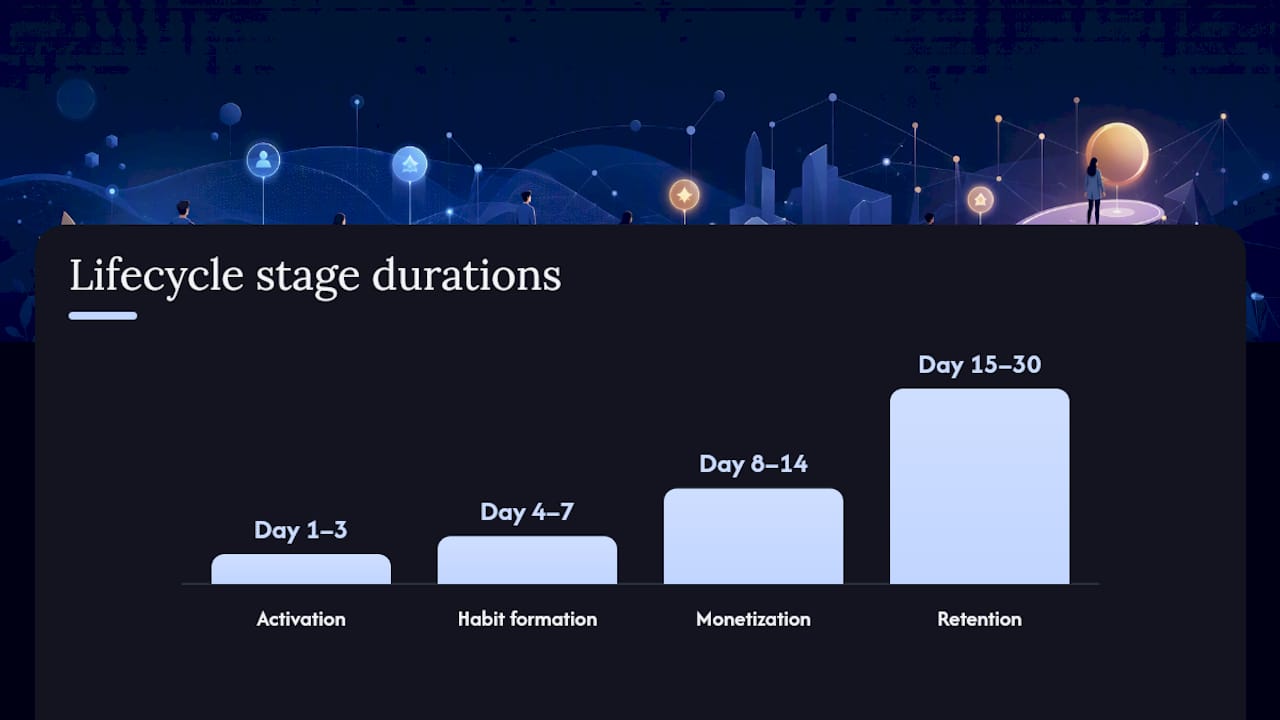
- Day 1–3 (activation): Push + in-app message prompting the first core action. Personalize by acquisition source if possible.
- Day 4–7 (habit formation): Push notification tied to a streak, reminder, or social proof signal. Email with a "here is what you can do next" prompt.
- Day 8–14 (monetization): Paywall prompt for users who have completed the golden path. Trial offer for users who have not yet converted.
- Day 15–30 (retention): Weekly digest or progress summary. Re-engagement push for users who have not opened the app in 5+ days.
Frequency controls and consent:
Cap push notifications at two per day maximum. Users who receive more than three pushes per day churn at significantly higher rates. Always respect opt-out signals immediately and never re-prompt for push permission after a user has declined.
Win-back playbook:
Target users who installed but have not opened the app in 14–30 days. Channel mix: email first (highest deliverability), then SMS for users who provided a number, then a retargeting ad on Meta or TikTok as a last touchpoint. Message angle: lead with what has changed or improved since they last used the app, not a discount. Track reactivated users as a separate cohort to measure their downstream LTV versus first-time converters.
Klaviyo's B2C marketing research shows that the top-performing consumer strategies in 2025–2026 combine personalization, owned channels (email and SMS), and creator content to reduce CPI while improving LTV, which is exactly the combination this lifecycle framework is built around.
Your week-by-week 90-day execution roadmap
The 90-day objective is to move from zero to a validated, scalable UA stack with a retention loop that proves the business model.
A phased 90-day plan consistently outperforms one-off launch bursts for early-stage apps, and the structure below reflects that evidence.
Phase 1: Foundation (Weeks 1–4)
- Week 1: Complete ASO (title, keywords, screenshots, preview video). Set up MMP and instrument five core in-app events. Configure App Store Connect and Google Play Console for experiments.
- Week 2: Launch Apple Search Ads keyword campaign ($50–$100/day). Set up analytics dashboards (installs, CPI, D1 retention). Brief first creator wave.
- Week 3: Review Apple Search Ads keyword data. Pause low-performing keywords. Analyze first 200 installs for behavioral patterns.
- Week 4: Go/no-go check at Day 30. Criteria: store CVR above 25% (iOS), D1 retention above 20%, CPI within 2× of target. If all three pass, proceed to Phase 2. If not, diagnose and fix before spending more.
Phase 2: Launch (Weeks 5–8)
- Week 5: Activate Meta or TikTok campaign with three creative variants. Launch first creator campaign (5–10 creators, one brief, one hook angle).
- Week 6: Run first screenshot A/B test in App Store Connect. Review creator content performance. Pause the weakest paid creative variant.
- Week 7: Scale the winning paid creative by 30–50%. Analyze D7 retention by channel. Start onboarding email sequence for registered users.
- Week 8: Go/no-go check at Day 60. Criteria: D7 retention above 10%, CPI at or below target, at least one creator creative outperforming paid control. If passing, proceed to Phase 3.
Phase 3: Iterate and Scale (Weeks 9–12)
- Week 9: Scale winning channel and creative combination. Brief second creator wave with new hook angle based on Week 5–8 data.
- Week 10: Launch win-back campaign for Day 14–30 churned users. Test a second paid channel (if Phase 2 was Meta, test TikTok, or vice versa).
- Week 11: Run full cohort analysis. Calculate 30-day LTV by channel and creative. Adjust budget allocation toward highest-LTV sources.
- Week 12: Compile 90-day performance report. Set 90-day targets for the next quarter based on validated CPI, D7 retention, and payback period data.
Reporting cadence:
- Daily standup (10 minutes): Installs, CPI, D1 retention, spend vs. budget.
- Weekly review (60 minutes): D7 retention by cohort, creative scorecard, ASO rank movement, budget pacing.
Cult Media's creator-driven UA playbook
Creator campaigns are the right channel when three conditions are met: the product has a demonstrable use case that translates to short-form video, the category has an active creator community on TikTok or Instagram, and the team wants to reduce paid acquisition costs without sacrificing scale. A commission-only, guaranteed-view model changes the risk profile entirely. Instead of paying a flat retainer for reach that may or may not convert, the marketer pays only for verified views delivered.
Playbook steps:
- Campaign setup: Define the target persona, the trigger moment, and the one value hook the creator must communicate. Set a guaranteed view target and a CPI ceiling. Agree on verification method (MMP postback or platform analytics with third-party confirmation).
- Creative brief structure: Give creators the persona, the hook, and the call-to-action. Do not script the video. Specify the first three seconds (the hook must appear before the fold), the app name, and the download CTA. Allow creative freedom in execution.
- Verification and view tracking: Track views at the campaign level and the creator level. Flag any creator whose view-to-click rate falls below category benchmarks. Pause and replace underperformers within 48 hours.
- Payment triggers: Payment releases when verified views hit the contracted threshold. No views, no payment. Partial delivery triggers partial payment on a pro-rata basis.
Sample campaign metrics to track:
- Views delivered vs. contracted (verification rate)
- View-to-click rate (benchmark: 1–3% for lifestyle and utility apps)
- Install rate from click (benchmark: 20–40% for high-intent creator traffic)
- CPI from creator channel vs. paid channel
- D7 retention for creator-sourced installs vs. paid-sourced installs
Influencer and creator content remains a top channel for driving awareness in consumer categories, and the commission-only model aligns creator incentives with marketer outcomes in a way that flat-fee sponsorships do not.
Pro Tip: When running creator campaigns alongside paid channels, whitelist top-performing creator content as paid dark posts. Creator whitelisting lets you amplify organic-performing content with paid budget while keeping the authentic creator format that drives higher engagement rates than brand-produced ads. Tag whitelisted posts separately in your MMP to avoid double-counting organic and paid attribution.
For a detailed breakdown of how to structure TikTok creator campaigns specifically, the TikTok app marketing playbook covers brief structure, content scoring, and measurement setup.
Pre-launch and launch checklist for your app marketing campaign
A failed launch is almost always a checklist problem, not a strategy problem. The store listing was not QA'd on the target device. The MMP SDK was firing duplicate events. The creative was approved but the tracking link was broken. Run this checklist before every major campaign launch.
Pre-launch items:
- Store listing QA: view the listing on an iPhone SE, an iPhone 15 Pro, and a mid-range Android device. Check screenshot rendering, preview video autoplay, and metadata truncation.
- Event mapping: confirm all five core in-app events are firing correctly in your MMP's test environment. Do not launch paid until this passes.
- Attribution SDK: validate that install postbacks are reaching your MMP within 5 minutes of a test install. Check iOS SKAN configuration separately.
- Creatives approved: all ad creatives approved by platform (Meta, TikTok, Apple) at least 48 hours before launch. Platform review delays are the most common launch-day blocker.
- Privacy and consent: confirm your consent management platform (CMP) is live and compliant with GDPR (for EU users), CCPA (for California users), and COPPA (for apps that may reach users under 13). ATT prompt timing should be configured for post-onboarding, not at first open.
Launch-day items:
- Monitoring dashboard live with real-time install and spend data.
- On-call owner assigned for the first 24 hours (one person, one Slack channel, one escalation path).
- First 24-hour creative rotation plan: if a creative's CTR is below 0.5% after 500 impressions, swap it. Do not wait 72 hours on launch day.
- Review and ratings prompt timing: configure the in-app review prompt to trigger after the user completes their first meaningful action, not at first open.
Smoke tests (run 24 hours before launch):
- Install the app via a test ad link and confirm the MMP records the install with the correct campaign tag.
- Complete the onboarding flow and confirm the activation event fires.
- Trigger the paywall and confirm the purchase event fires (use a sandbox transaction).
Immediate post-launch monitoring (first 48 hours):
- CPI vs. target (flag if 2× above target within 6 hours).
- D1 retention (flag if below 15% after 200 installs).
- Store rating (monitor for any sudden negative review clusters).
- Spend pacing (confirm daily budget caps are enforced and not overdelivering).
Legal and compliance considerations in B2C app marketing
Data privacy law is not a legal team problem. It is a marketing infrastructure problem, because the consent and data collection decisions made at launch determine which channels you can use, which audiences you can target, and which attribution methods are available to you.
GDPR (European Union): Any app marketed to EU users must collect explicit, informed consent before processing personal data for advertising purposes. This means your ATT prompt (iOS) and your consent management platform must be configured before you run a single paid impression targeting EU users. Retargeting EU users without a valid consent signal is a regulatory violation, not just a policy issue.
CCPA (California, United States): California residents have the right to opt out of the sale of their personal data. If your app collects behavioral data and shares it with ad networks (which all paid UA does), you need a "Do Not Sell My Personal Information" mechanism in your app and on your website. The California Privacy Rights Act (CPRA) extended these requirements in 2023.
COPPA (United States): If your app is directed at children under 13, or if you have actual knowledge that a user is under 13, COPPA applies. This prohibits behavioral advertising, limits data collection, and requires verifiable parental consent. Apps in the education, gaming, and entertainment categories are most frequently subject to COPPA enforcement.
ATT (App Tracking Transparency, iOS 14.5+): Apple's ATT framework requires explicit user permission before an app can track users across other apps and websites for advertising purposes. Opt-in rates vary by category and prompt timing, but apps that delay the ATT prompt until after the user has experienced core value consistently see higher opt-in rates than apps that prompt at first open.
Practical compliance checklist:
- Integrate a CMP (Consent Management Platform) such as OneTrust or Usercentrics before launch.
- Configure your MMP to respect consent signals and suppress data collection for users who opt out.
- Review your ad network data-sharing agreements to confirm they comply with GDPR Standard Contractual Clauses (SCCs) for data transfers outside the EU.
- If your app targets or may reach users under 13, conduct a COPPA compliance review with legal counsel before launch.
- Document your data retention policies and make them accessible in your app's privacy policy.
This section covers general compliance considerations, not legal advice. Confirm your specific obligations with qualified legal counsel before launch.
What most teams get wrong, and how to reframe it
The most common mistake in B2C app marketing is optimizing for installs when the business runs on retention. Teams that skip ASO and go straight to paid are paying to send traffic to a listing that converts at half its potential. Teams that skip event mapping are optimizing their paid campaigns toward users who open the app once and never return.
The commission-only creator network model corrects for a specific version of this problem. Traditional agency retainers charge for effort regardless of outcome, which means a marketer can spend $20,000 on a creator campaign and receive 50 pieces of content that generate 10,000 views and 200 installs. A commission-only model ties payment to verified views, which forces the network to select creators and formats that actually deliver. That alignment changes the incentive structure at every level of the campaign.
The corrective action is simple: before you spend another dollar on paid UA, instrument your activation event, check your store CVR, and calculate your current D7 retention. Those three numbers will tell you exactly where the funnel is broken and where the next dollar should go.
How a commission-only creator network accelerates your UA
Cult Media's commission-only creator network is built specifically for consumer tech apps that need guaranteed view volume without the retainer risk of traditional influencer marketing. The model is straightforward: you pay a fixed CPM only for verified views delivered by Cult Media's managed creator network, with no upfront fees and no payment for content that does not perform.
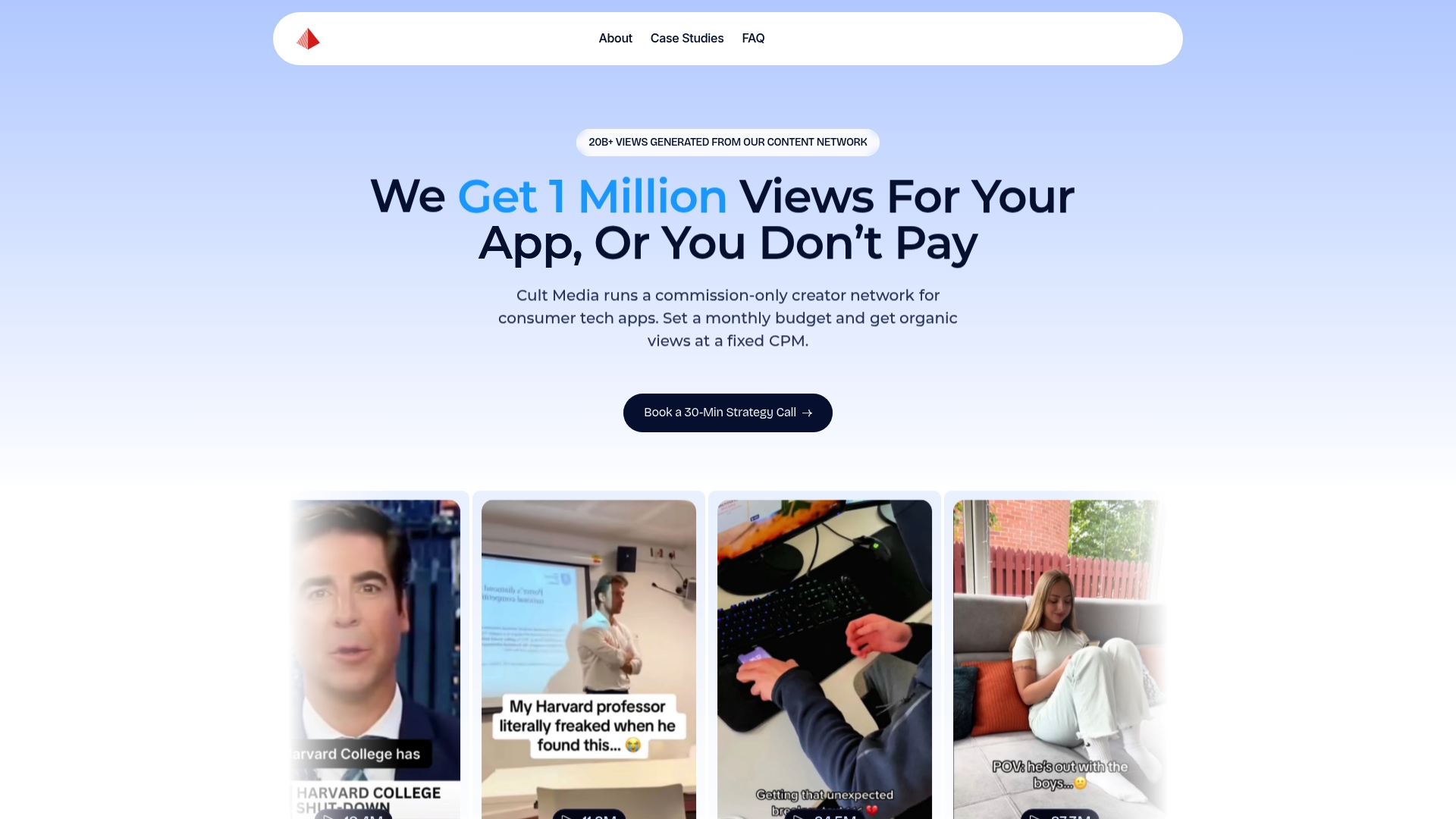
For app founders and growth marketers who have validated their CPI target and want to scale creator-driven UA without building an in-house influencer team, Cult Media handles creator selection, briefing, content review, distribution across TikTok and Instagram, and view verification. Campaigns are structured around your target persona and value hook, with creator output feeding directly into your paid testing pipeline for whitelisting and amplification. Reporting covers views, view-to-click rate, install rate, and CPI by creator, so every campaign decision is grounded in data.
To start a campaign, visit Cult Media and share your app category, target CPI, and monthly install goal. The team will scope a guaranteed-view campaign and walk you through the brief structure and verification process before any contract is signed.
Sources
- Mobile App Marketing Strategy: A Data-Backed 2026 Guide
- Mobile App Marketing: The Complete Playbook | Sonar Blog
- Marketing Strategy for Mobile Apps: 2026 Playbook – Call Loop
FAQ
What is B2C app marketing?
B2C app marketing is the practice of acquiring, activating, and retaining individual consumers for a mobile app through channels including ASO, paid social, creator campaigns, and lifecycle messaging. The funnel runs from discovery in the App Store or Google Play through install, activation, retention, and monetization.
How is a B2C app marketing plan different from B2B, C2C, or D2C marketing?
B2C app marketing targets individual consumers and relies on app-store discovery, in-app monetization, and short purchase cycles. B2B targets businesses with longer sales cycles and relationship-driven channels. C2C connects consumers to each other (marketplace apps). D2C sells directly to consumers, often without a third-party store layer, giving the brand more control over the purchase experience than an app publisher has.
What does B2C stand for?
B2C stands for "business-to-consumer," meaning the business sells directly to individual end users rather than to other businesses. In app marketing, B2C describes consumer-facing apps (fitness, finance, entertainment, productivity) as opposed to enterprise or SaaS tools sold to companies.
What KPIs should a B2C app marketing plan prioritize?
The core KPIs are CPI (Cost Per Install), D1 and D7 retention rates, DAU/MAU ratio, LTV (Lifetime Value), and payback period. Track CPI and D1 retention daily in the first 30 days; shift focus to D7 retention and LTV as cohort data matures.
When should a consumer app use a creator network instead of paid social?
Creator networks work best when the product has a demonstrable use case that translates to short-form video and the category has an active creator community on TikTok or Instagram. A commission-only model like Cult Media's is particularly effective when the team wants to reduce paid acquisition costs without committing to a flat-fee retainer, because payment is tied to verified views rather than effort.